Check media consents
See whose photos must not appear in a place, before you post team photos or a match report. Owners and admins can do this, and members with the Media and consents task.
- In the admin, open Consents.
- Under Channel, choose where you want to publish: Clubkit App, Club website, Facebook, Instagram or Press.
- Under Team, choose the team in the photo, or All teams.
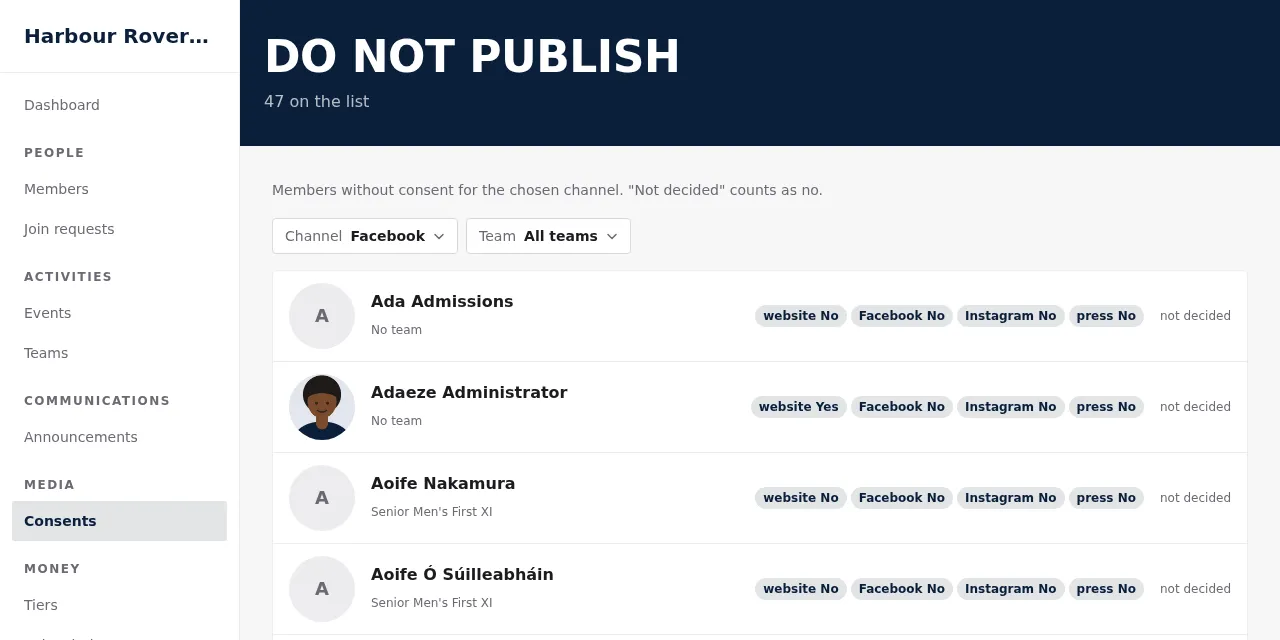
The list shows everyone who must not appear there, with their photo so you can recognise them, and the reason: not granted, not decided, withdrawn … or no guardian linked. "Not decided" counts as no.
It's a live list: a withdrawal shows at once. There is no export and no print, on purpose.
On a phone at the match, open More → Do not publish in the app for the same list.
Who decides
Only the member decides for themselves, and for under-18s their guardians (or the teenager after the handover). Staff can see the choices on each member's page under Photos and publication, but can't change them.